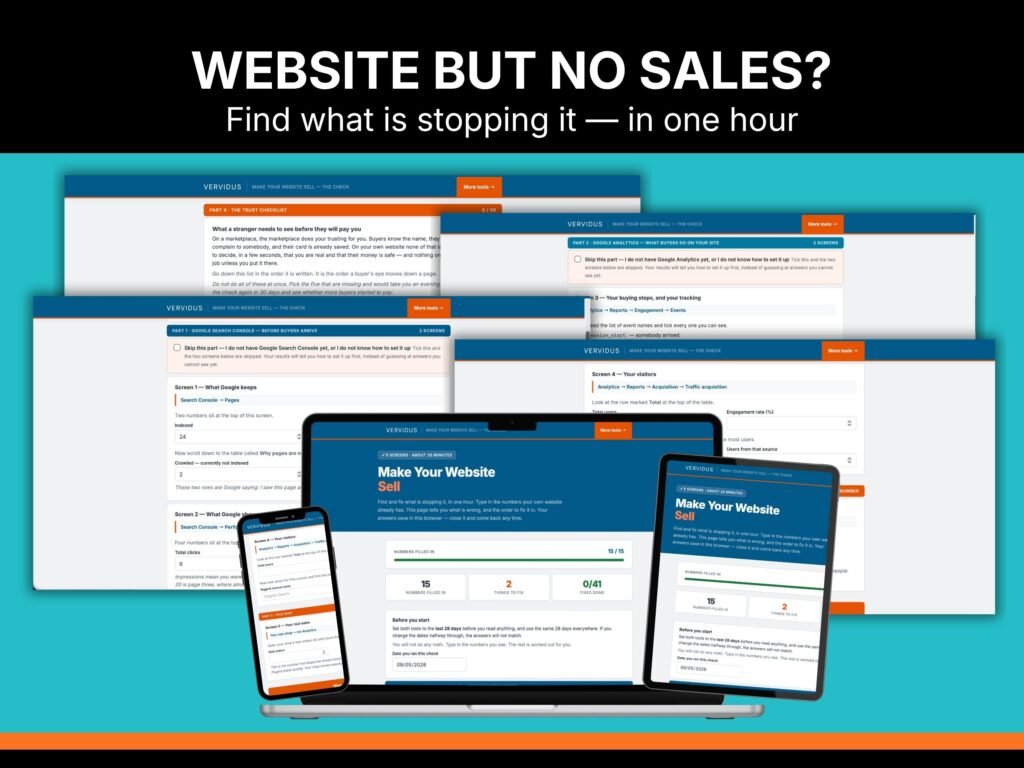
Make Your Website Sell is a check you run on your own website in about an hour. You type in numbers your site already has, and it tells you everything that is stopping the sale, in the order to fix them, with the steps for each one. It is two files — an interactive check that opens in any browser, and a guide that shows you where every number lives. Built for people selling handmade or digital products who have a website of their own and cannot work out why it is so quiet.
You did the work. So why is nothing happening?
You built the website. Maybe you paid for the theme. Maybe you ran a few ads or pinned a few pins. And it sits there.
Sellers say it like this:
“It’s been hard work setting up the site. I have managed to push a decent number to my site but no sales yet.”
“I don’t know SEO for the website, and it costs too much to hire someone.”
“Wish I’d started the website when I opened my Etsy store.”
You are not lazy, and you are not bad at this. You are guessing. And the thing about guessing is that it costs you the only thing you do not have — the few free hours you get after the day job.
Two completely different problems look exactly the same
A quiet website means one of two things.
Nobody is arriving. Or people are arriving and leaving.
From where you sit, both look identical. Zero sales, both times. But they need opposite fixes, and every hour you spend on the wrong one is an hour gone.
Most people pick the wrong one. They rewrite the homepage when nobody could find it. They start a blog when the visitors were already there and left. Then they conclude the website does not work and let it sit.
This tells you which one you have before you touch anything.
And if it turns out to be the first one—nobody is arriving—the next question is which of your channels was supposed to be sending them. The Social Media Audit scores Instagram, Facebook, and Pinterest out of 12 each and tells you which one to keep.
Why does this cost $24 and not $240?
Because I built it for myself first.
In September, I found out my own website had not recorded a single visit for five weeks. Everything looked correct. Every settings screen said it was working. The problem only showed up when I compared two dates and then watched a real page load.
I had nearly spent a month rebuilding a website that was fine.
So I wrote down what I should have checked, in what order, and turned it into a file that does the checking for you. It costs me nothing to hand it to the next person, and I would rather you found your problem in an hour than lost the same month I nearly lost.
I have sold online for 11 years, and on Etsy for 7. I am not teaching you from a course. I am handing you the thing I needed.
It tells you when your numbers mean nothing
This is the part nobody sells you.
At a normal rate, one or two visitors in every hundred buy something. So if 60 people came to your website last month, the expected number of sales is about one. Zero is a completely normal result at that size. It does not mean your product is wrong, your price is wrong, or your website is broken.
Most people never hear this. They read zero sales as proof it will never work, and they stop.
The check does the sum with your own number in it, and tells you plainly when there is not enough there to judge — and what to do instead.
What you get (instant download)
The check. One file that opens in any browser. Nothing to install, no account, no login, nothing that expires. You put in numbers your website already has, press one button, and get back everything that is wrong with it, numbered in the order to fix them. Every fix is broken into short steps you tick off. It remembers where you stopped, so you can do twenty minutes tonight and pick it up next week.
The guide. 29 pages. It shows you where every number lives, click by click, with separate paths for WordPress, Shopify, Squarespace, and Wix. Then one section for every answer the check can give you: what it means, why it happens, what to do, what not to do, how long it takes, and how you will know it worked.
A trust checklist. Thirty things a stranger needs to see before they will hand money to a shop they have never heard of. Tick them off as you go.
No return policy page yet? The Return and Refund Policy Template gives you one in about 20 minutes.
Two free bonuses.
The 30-Day Tracker. One row a week. It follows the numbers that move before sales do, so you can tell “not working” from “not yet.”
Copy-Paste Scripts. Ready wording for the five places everyone freezes — your refund line, your delivery promise, your reply time, your review request, and your abandoned cart email. Nothing to write.
Both files download the moment you pay. Nothing is posted to you.
The 30-Day Moved-Numbers Promise
Not “satisfaction guaranteed.” Here is the actual promise.
Run the check. Do the first job on your list — only the first one. Write your numbers in the tracker once a week for 30 days.
If not one of your leading numbers has moved, send me your tracker. I will run the whole check on your website myself and send you back your own list, in writing, at no extra cost.
I answer personally. There is only one of me, so this is limited to 10 a month. If the month is full, you go to the front of the next one.
This is not a course
It is not a course, not a video, and not a webinar. You already have too much to learn — that is half the problem.
It is not a list of thirty things to fix. It is one queue, and you do not start number two until number one is done.
It is not general advice. Every answer it gives you is triggered by a number from your own website. If your numbers are fine, it tells you your website is fine and sends you to do something else.
Who this is for
You sell handmade or digital products. You have a website of your own, or you started one and it has been sitting there. You get a few sales a month, and you are doing this around a job.
You have limited hours, and you are tired of spending them on the wrong thing.
This is not for you if you have no website yet, if you want somebody to build one for you, or if you are looking for a shortcut that does not involve opening your own numbers.
Frequently asked questions
Why is my website not getting sales?
Almost always one of a small number of reasons, and they are not the ones people guess. Either your pages are not being kept by Google, or they are being shown and not chosen, or visitors arrive and cannot tell what you sell, or they reach a product, and nothing on the page makes them feel safe paying you — or there are simply not enough visitors yet for anything to be judged. This check shows you which one is yours based on your numbers, so you stop guessing.
Do I need to be good with numbers?
No. You do not do any math. You read numbers off the screen and type them into boxes. Everything is worked out for you.
What software do I need?
A web browser and two free Google tools — Google Analytics and Google Search Console. If you do not have them or do not know how to set them up, the guide walks you through it from scratch, and the check has a box you tick so it skips those questions instead of guessing.
How long does it take?
About twenty minutes to gather your numbers if the tools are already set up, and about an hour in total, including reading your results. Setting up the tools from scratch adds around thirty minutes, once.
Does this work if I sell on Shopify, WooCommerce, Squarespace, or Wix?
Yes. The numbers it uses are the same on every platform. The guide gives separate click paths for WordPress, Shopify, Squarespace, and Wix. Check if your platform and current plan offer an Analytics connection. Free plans generally don’t offer this option.
Does this work for an Etsy shop?
This one is for your own website. If Etsy is your only shop, the Do-It-Yourself Etsy Shop Audit is the right file for you.
Will it tell me exactly what to change on my website?
Yes. Every problem it finds comes with short, numbered steps you tick off, and the guide explains each one in full, including what not to do.
Is this the same as a website audit someone would sell me?
You are doing the audit on your own site, with your own numbers, and keeping the file to run again next month. A paid audit is a report you have to act on alone. This is the same job, done by you, for the price of lunch.
Is anything shipped to me?
No. Nothing is posted. Both files download straight away after you pay, and the links are also emailed to you.
Can I share it with a friend?
No. It is for you and your own shop. You are welcome to send them here.
Can I get a refund on a digital download?
Because the files download immediately, they cannot be returned. That is why the 30-Day Moved-Numbers Promise exists instead — it is worth more than $24 back, and it needs you to actually use the thing.
How often should I run it?
Once a month is plenty. It saves your last answers so you can compare.
License
For your own shop only. You may use it for as many of your own websites as you own. You may not share the files, resell them, give them away, or include them in anything you sell. The wording inside the Copy-Paste Scripts is yours to use on your own website.
About Vervidus
I am Jurga. I have sold online for 11 years, and on Etsy for 7, alongside running physical retail.
Vervidus exists because of one thing I kept seeing: sellers do not need more information. They need help making the knowledge they already have work in real life. Most shops are not losing sales because the owner does not know enough. They are losing sales because nobody ever told them which one thing to fix first.
Everything I sell, I have used on my own shop first. This one came out of a month I nearly wasted on my own website.
You can message me, and I will answer personally.